
Frigya

A vocabulary-first language learning app

Learn vocabulary in 11 languages, and keep it

Frigya is a language learning app built on spaced repetition. You first meet new words (Discover), then review them at the right moments so they stick (Learn). Start free on Android from Google Play, no account needed.
Get it on Google Play iOS: Coming soon The App Store version is in preparation

You can start without creating an account.
  • 12 interface languages
  • 11 languages to learn
  • A1–C2 levels
  • Ad-free
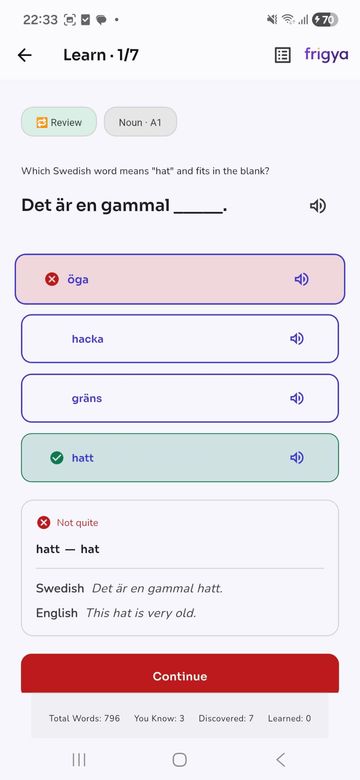
Frigya fill-in-the-blank question asking which word fits the sentence
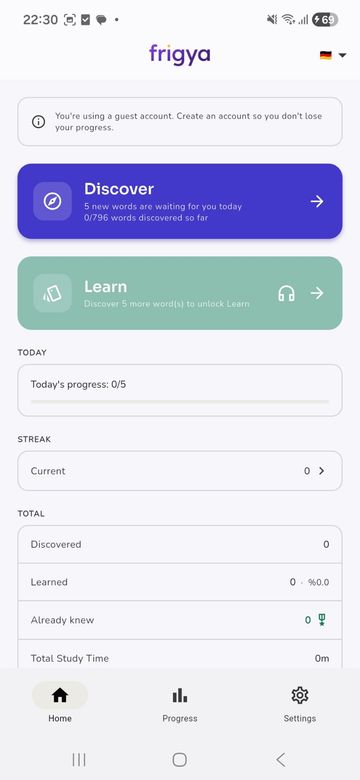
Frigya home screen with Discover and Learn cards, daily progress and streak
5, 10, 20, 40 or 50 words a day
Audio for words and example sentences

How it works

Two stages, one routine

Most vocabulary apps either keep showing you new words or keep drilling old ones. Frigya separates the two on purpose and connects them.

Stage 1

Discover

You meet new words one by one from the levels you chose. If you get a word right on the first try, it is marked as already known, so you are not made to repeat it. A session is as long as your daily goal.

Stage 2

Learn

You turn the words you have met into lasting memory with spaced repetition. It unlocks after you discover your first few words and continues until the pool is finished or you decide to stop.

See the method in detail →

Inside the app

A calm, focused interface

Frigya Learn screen: a four-option sentence question about the Swedish word for "hat" with example sentences after answering

Questions in context

Pick the word that fits the blank. After answering, you see an example sentence in both languages.
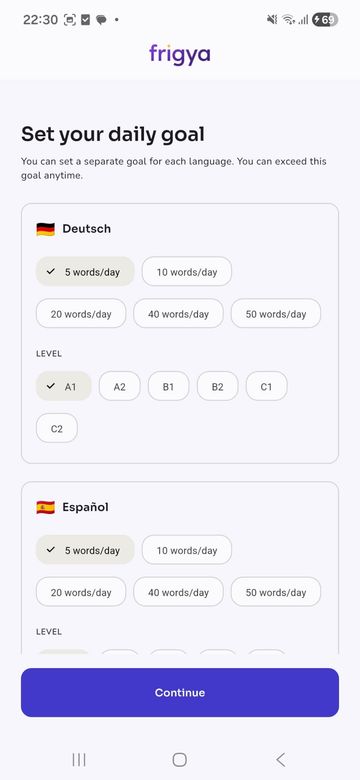
Frigya daily goal screen: 5, 10, 20, 40 and 50 words a day and A1–C2 level chips

A separate goal per language

Set the daily word goal and the levels you study for each language on its own.
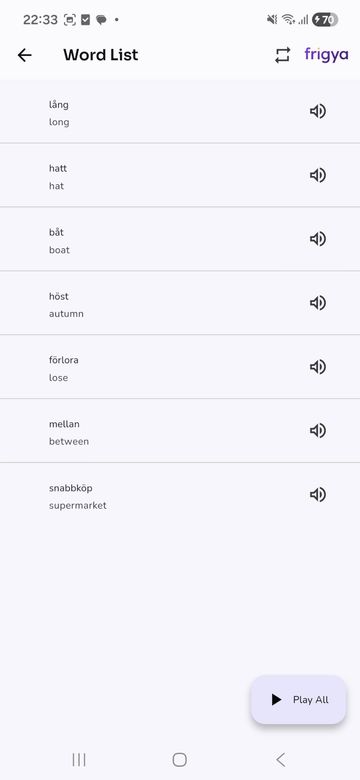
Frigya word list showing Swedish words, their English meanings and audio icons

Word list with audio

See the words you have discovered and listen to them one by one or with Play All.
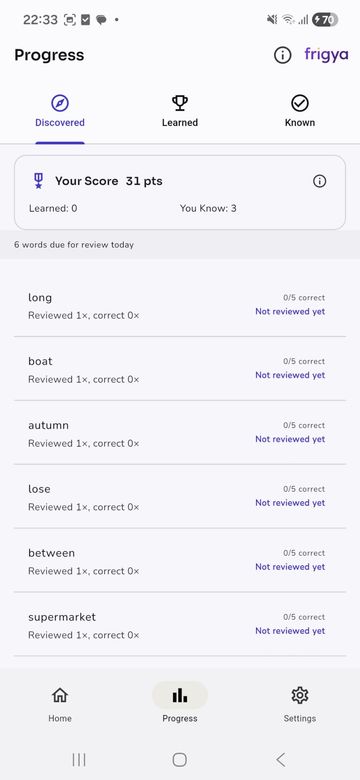
Frigya progress screen with Discovered, Learned and Known tabs, a score and the number of words due today

Progress at a glance

Discovered, learned and already-known words each get their own tab.

Screenshots are real captures of the app, shown with the English interface.

Features

Small details that help you build a habit

  • 01

    Spaced repetition

    Words come back at the right time, following the forgetting curve.

  • 02

    Daily goal

    5, 10, 20, 40 or 50 new words. You decide.

  • 03

    Streak and progress

    Your streak, study time and word counts on one screen.

  • 04

    Audio

    Listen to words and example sentences; turn on automatic question audio.

  • 05

    Start as a guest

    Try it right away. Link a Google account whenever you want.

  • 06

    Light and dark theme

    Follow your system theme or choose. Customize the home screen.

See every feature →

Languages

Pick from 11 languages other than your own

The interface comes in 12 languages. Whatever your own language is, you cannot pick it as a target; you can add as many of the other 11 as you like at the same time. If you remove a language later, your progress is not deleted.

See all languages →

Levels

Study words that match your level

For each language you choose which levels to study, from A1 to C2. Starting out? Begin at A1. Aiming for fluency or an exam? Go higher.

Levels guide →

  1. A1
  2. A2
  3. B1
  4. B2
  5. C1
  6. C2

Who it is for

For people who want short, regular study

  • Students

    People who want to grow vocabulary systematically for school, university or exams.

  • Working professionals

    People who can fit a ten-minute routine into a busy day.

  • Curious beginners

    Anyone taking a first step into Spanish, German, French or another language.

  • Future expats

    People who want to build up everyday words step by step before moving abroad.

An honest note: Frigya focuses on vocabulary. It does not replace speaking, listening or grammar practice; it is designed as a vocabulary routine that complements them.

Free word lists

Themed, with example sentences and free. Everyday life, food, travel and more.

See all lists →

Frequently asked questions

What is Frigya?
Frigya is a mobile language learning app that focuses on vocabulary. It has two stages: Discover, where you meet new words, and Learn, where you lock them in with spaced repetition. See How it works.
Is Frigya free?
Yes. According to the Terms of Use, Frigya is a free educational app and currently contains no ads or in-app purchases. Free use has limits on how many new words you can discover (guests have fewer, signed-in users have more, and a small extra allowance continues daily). You will see the exact limits in the app; we do not publish figures here.
Do I need an account?
No. The app opens in guest mode with no account. If you want to keep your progress you can link a Google account (Apple on the iOS version).
Which languages can I learn?
The 11 languages other than your interface language. With English selected: Spanish, German, French, Italian, Portuguese, Dutch, Swedish, Norwegian, Danish, Finnish and Turkish. See Languages.
Which languages is the app available in?
The interface comes in 12 languages: English, Turkish, Spanish, French, German, Italian, Portuguese, Swedish, Norwegian, Danish, Dutch and Finnish.
What levels are covered?
Words are grouped by CEFR level: A1, A2, B1, B2, C1 and C2. For each language you choose which levels to study. See Levels.
What is the difference between Discover and Learn?
In Discover you meet new words one at a time; a word you get right on the first try counts as already known. In Learn you reinforce the words you have met with spaced repetition. Learn unlocks after you discover your first few words.
What is spaced repetition?
A learning method where you see something again just before you would forget it. Because reviews are spread out, the same study time produces longer-lasting memory. More: What is spaced repetition?
What do the questions look like? Is it always multiple choice?
Yes, questions are multiple choice. The wrong options come at random from a large pool at the same level. Many questions ask for the word inside a sentence.
How do I set my daily goal?
Choose how many new words to discover each day: 5, 10, 20, 40 or 50. The goal is per language, can be changed at any time and can be exceeded.

See all questions →

Start with five words today.

Try it without an account. If you like it, link your progress to one.

Get it on Google Play iOS: Coming soon The App Store version is in preparation